


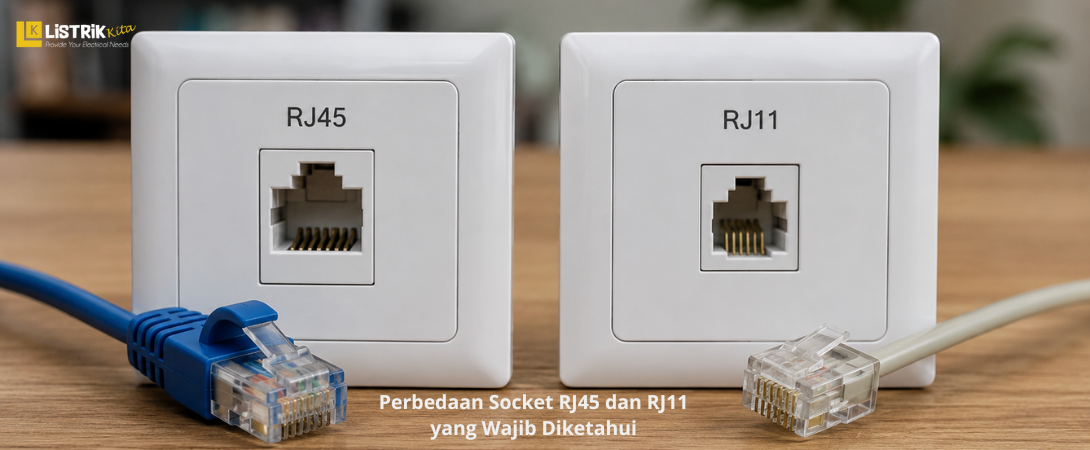
Choosing the right socket is an important step when installing a network or telephone system. Although RJ45 and RJ11 look similar at first glance, they have different functions, sizes, and pin configurations. Using the wrong connector can prevent your devices from working properly and may affect the overall quality of the installation.
Whether you are a technician, contractor, or homeowner installing a new network or telephone line, understanding the difference between RJ45 and RJ11 will help you choose the right product. Here is everything you need to know.
What Are RJ45 and RJ11 Sockets?
What Is an RJ45 Socket?
An RJ45 socket is a connector designed for Ethernet and computer networking. It is commonly used in Local Area Network (LAN) installations to connect computers, routers, switches, wireless access points, and IP CCTV cameras.
Because it supports high speed data transmission, RJ45 has become the standard connector for modern network installations in homes, offices, commercial buildings, and industrial facilities.
What Is an RJ11 Socket?
An RJ11 socket is mainly used for telephone communication systems. It is commonly found in landline telephone connections, fax machines, and DSL modems that operate through telephone lines.
Although it looks similar to an RJ45 connector, its purpose is different. RJ11 is intended for voice communication and low speed data transmission rather than Ethernet networking.
Differences Between RJ45 and RJ11 Sockets
Physical Size and Shape
The easiest way to tell these connectors apart is by looking at their size.
An RJ45 socket is larger and has a wider rectangular shape because it needs to accommodate eight pins.
An RJ11 socket is smaller and narrower, making it easy to distinguish when placed next to an RJ45 connector.
Checking the physical size is often the fastest way to identify the correct connector before installation.
Number of Pins
Another major difference is the pin configuration.
RJ45 uses an 8P8C (8 Position 8 Contact) configuration, which means it has eight positions with eight active contacts. All eight pins are used to support Ethernet data communication.
RJ11 typically uses a 6P4C (6 Position 4 Contact) configuration. In some telephone applications, only two pins are used for the communication line. Since it has fewer contacts, RJ11 is not designed for high speed networking.
Functions and Applications
RJ45 is used for computer networks and internet connections. It is commonly installed in LAN systems for homes, offices, schools, data centers, and industrial environments.
RJ11 is mainly used for analog telephone lines, fax machines, and DSL modems. Its primary purpose is voice communication rather than computer networking.
Understanding these different applications helps ensure the correct connector is selected for every installation.
Cable Types
RJ45 is commonly paired with UTP or STP network cables such as Cat5e, Cat6, Cat6A, and Cat7. These cables are designed to support reliable high speed data transmission.
RJ11, on the other hand, uses telephone cables with fewer conductors. These cables are suitable for voice communication but are not intended for Ethernet networking.
Data Transmission Speed
RJ45 supports Ethernet speeds ranging from 10 Mbps up to 10 Gbps, depending on the cable category and networking equipment.
RJ11 is intended for voice communication and low speed services such as DSL. It is not suitable for modern high speed computer networks.
Can an RJ11 Connector Be Plugged Into an RJ45 Port?
Many people wonder whether an RJ11 connector can be inserted into an RJ45 port. On some devices, the smaller RJ11 connector may physically fit inside the larger RJ45 port.
However, this does not mean they are compatible. Their different pin layouts, functions, and communication standards make this combination unsuitable. Using the wrong connector may result in poor performance and could damage the connector over time.
How to Identify RJ45 and RJ11 Sockets
The easiest way to identify these sockets is by checking their physical size, counting the visible metal contacts, and considering the intended application. If the connection is for Ethernet or a LAN network, you need an RJ45 socket. If it is for a telephone line or DSL modem, RJ11 is the correct choice.
RJ45 and RJ11 may look similar, but they are designed for completely different purposes. RJ45 is larger, uses an 8P8C configuration, and supports high speed Ethernet networking. RJ11 is smaller, typically uses a 6P4C configuration or only two active contacts in some applications, making it ideal for telephone systems.
Choosing the correct socket helps ensure a reliable and professional installation. If you are looking for genuine Simon RJ45 and Simon RJ11 sockets for your home, office, or commercial project, visit Listrik Kita. You will find quality electrical products at competitive prices to support every installation.
